

Westland Flopro Digital Timer
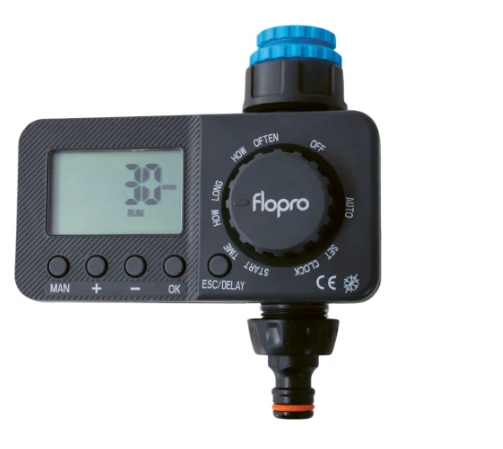
Make watering your garden effortless with our easy to use Flopro Digital Timer. Featuring a clear LCD, this timer is designed to take the hassle out of garden care, giving you full control over your watering schedule.
With six automatic schedules to choose from, you can tailor watering to suit your garden’s needs. The timer offers both automatic and manual modes, giving you the flexibility to water on demand or let the schedule do the work for you. A built-in rain delay function helps conserve water by pausing schedules when rain is forecast. In addition, the frost-proof design ensures reliable use all year round.
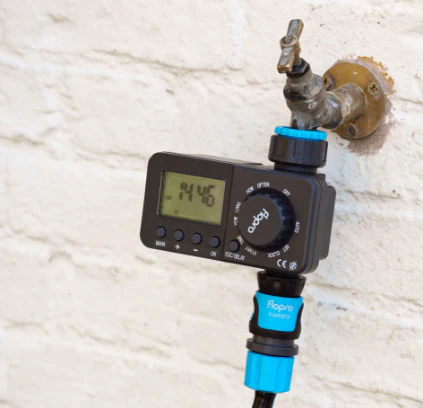
You can set watering durations from just a few minutes up to an impressive 360 minutes, making it suitable for a wide variety of gardens and plant needs. The universal fitting means it’s compatible with all watering brands and standard taps, so you can integrate it easily into your existing system. For extra peace of mind, the timer comes with a three year guarantee, ensuring long-lasting performance.
- Easily to use programmable timer with LCD
- Simple and easy to use
- 6 auto schedules
- Automatic and manual modes to suit watering needs
- Rain delay function
- Frost proof
- Run time up to 360 minutes
- 3 year guarantee
- Fits all watering brands and all taps
HOW TO USE
- Insert 2 x AA batteries – batteries are not supplied
- Set the time by turning the dial to “SET CLOCK”. Set the correct time by using the “+” and “-” buttons. Hold the buttons down to speed up the setting
Automatic Mode
- Set the Start Time:
Turn dial to “START TIME”. Set desired time by using the “+” and “-” buttons. Hold buttons down to speed up the setting - Set the Running Time:
Turn the dial to “HOW LONG”. Set desired time by using the “+” and “-” buttons. Hold buttons down to speed up the setting. The setting ranges from 0 secs – 360 mins - Set the Frequency:
Turn the dial to “HOW OFTEN”. Set desired parameter by using the “+” and “-” buttons. The setting ranges from 10 secs to 7 days - Once all the above have been completed turn the dial to “RUN” to start your Automatic Watering Program. When set the display will alternate between the current time and what time the next watering schedule is due to start.
Rain Delay Function
- Press the rain delay button to delay your Auto Set Program in wet weather. Keep pressing the button to move between 24, 48 or 72 hours
- Once set the display will alternate between the current time and a countdown of the set delay time
- To cancel the rain delay function, turn the dial to “OFF” and then back to “RUN”, the timer will resume to your Automatic Program set
Manual Mode
- Turn the dial to “RUN” and press the Manual Watering Button. Set desired time by using the “+” and “-” buttons. Hold buttons down to speed up the setting. You can set the time range between 0-360 mins
- Once set the display will alternate between the current time and a running countdown of the manual watering time set
- The water drops will flash in a clockwise motion to indicate that the manual setting is in progress
- To cancel – Turn the dial to “OFF”. When the dial is turned back to “RUN” the timer will revert back to the set Automatic Watering program
Original: $58.04
-65%$58.04
$20.31Product Information
Product Information
Shipping & Returns
Shipping & Returns
Description
Make watering your garden effortless with our easy to use Flopro Digital Timer. Featuring a clear LCD, this timer is designed to take the hassle out of garden care, giving you full control over your watering schedule.
With six automatic schedules to choose from, you can tailor watering to suit your garden’s needs. The timer offers both automatic and manual modes, giving you the flexibility to water on demand or let the schedule do the work for you. A built-in rain delay function helps conserve water by pausing schedules when rain is forecast. In addition, the frost-proof design ensures reliable use all year round.
You can set watering durations from just a few minutes up to an impressive 360 minutes, making it suitable for a wide variety of gardens and plant needs. The universal fitting means it’s compatible with all watering brands and standard taps, so you can integrate it easily into your existing system. For extra peace of mind, the timer comes with a three year guarantee, ensuring long-lasting performance.
- Easily to use programmable timer with LCD
- Simple and easy to use
- 6 auto schedules
- Automatic and manual modes to suit watering needs
- Rain delay function
- Frost proof
- Run time up to 360 minutes
- 3 year guarantee
- Fits all watering brands and all taps
HOW TO USE
- Insert 2 x AA batteries – batteries are not supplied
- Set the time by turning the dial to “SET CLOCK”. Set the correct time by using the “+” and “-” buttons. Hold the buttons down to speed up the setting
Automatic Mode
- Set the Start Time:
Turn dial to “START TIME”. Set desired time by using the “+” and “-” buttons. Hold buttons down to speed up the setting - Set the Running Time:
Turn the dial to “HOW LONG”. Set desired time by using the “+” and “-” buttons. Hold buttons down to speed up the setting. The setting ranges from 0 secs – 360 mins - Set the Frequency:
Turn the dial to “HOW OFTEN”. Set desired parameter by using the “+” and “-” buttons. The setting ranges from 10 secs to 7 days - Once all the above have been completed turn the dial to “RUN” to start your Automatic Watering Program. When set the display will alternate between the current time and what time the next watering schedule is due to start.
Rain Delay Function
- Press the rain delay button to delay your Auto Set Program in wet weather. Keep pressing the button to move between 24, 48 or 72 hours
- Once set the display will alternate between the current time and a countdown of the set delay time
- To cancel the rain delay function, turn the dial to “OFF” and then back to “RUN”, the timer will resume to your Automatic Program set
Manual Mode
- Turn the dial to “RUN” and press the Manual Watering Button. Set desired time by using the “+” and “-” buttons. Hold buttons down to speed up the setting. You can set the time range between 0-360 mins
- Once set the display will alternate between the current time and a running countdown of the manual watering time set
- The water drops will flash in a clockwise motion to indicate that the manual setting is in progress
- To cancel – Turn the dial to “OFF”. When the dial is turned back to “RUN” the timer will revert back to the set Automatic Watering program